ProxyDesk is a desktop app that runs a local SOCKS5 proxy and an HTTP proxy on 127.0.0.1 and spreads the connections it receives across your ProxyForge proxies. Point a crawler, a test suite or a shell at the local address once, and adding, retiring and re-testing proxies happens in the app instead of in each tool's configuration. This guide covers the download, getting proxies into it, the snippets it generates, what a client sees when a proxy dies, and the activity log you can export afterwards.
Download it and check the archive
Builds for Windows, Linux and macOS are on the desktop app screen of your dashboard, each with its SHA-256 beside it. Check the archive before you unpack it. On Linux:
sha256sum proxydesk-linux-amd64.tar.gz
The hash must equal the one the dashboard shows. The release notes are plain about signing: Windows builds are unsigned, so SmartScreen warns on first run, and macOS builds are unsigned and not notarized. The download contains the desktop app only; there is no headless build for servers, so ProxyDesk runs on a machine with a desktop session.
Add proxies: sign in, or import a list
Sign in to ProxyForge opens your browser at the dashboard. After you sign in, the app picks the session up by itself; if it does not, the sign-in page shows a code to paste under Have a code?. The From my account tab on the Proxies page then lists your proxies with their type, protocol, country, status and expiry. Select one and press Connect to add it to ProxyDesk and start the listeners. Account proxies of the HTTPS type are refused, because the engine speaks SOCKS5 and HTTP to an upstream, not TLS.
To bring in a list, use Import and paste one proxy per line in any of these forms:
host:port
host:port:user:pass
user:pass@host:port
socks5://user:pass@host:port
A line without a scheme is treated as HTTP, and lines starting with # are ignored. Before anything is added, every line is parsed and shown as Ready, Skipped or Fix. A duplicate of a proxy already in the pool is skipped, and a malformed line comes with a specific hint, such as a port outside 1 to 65535.
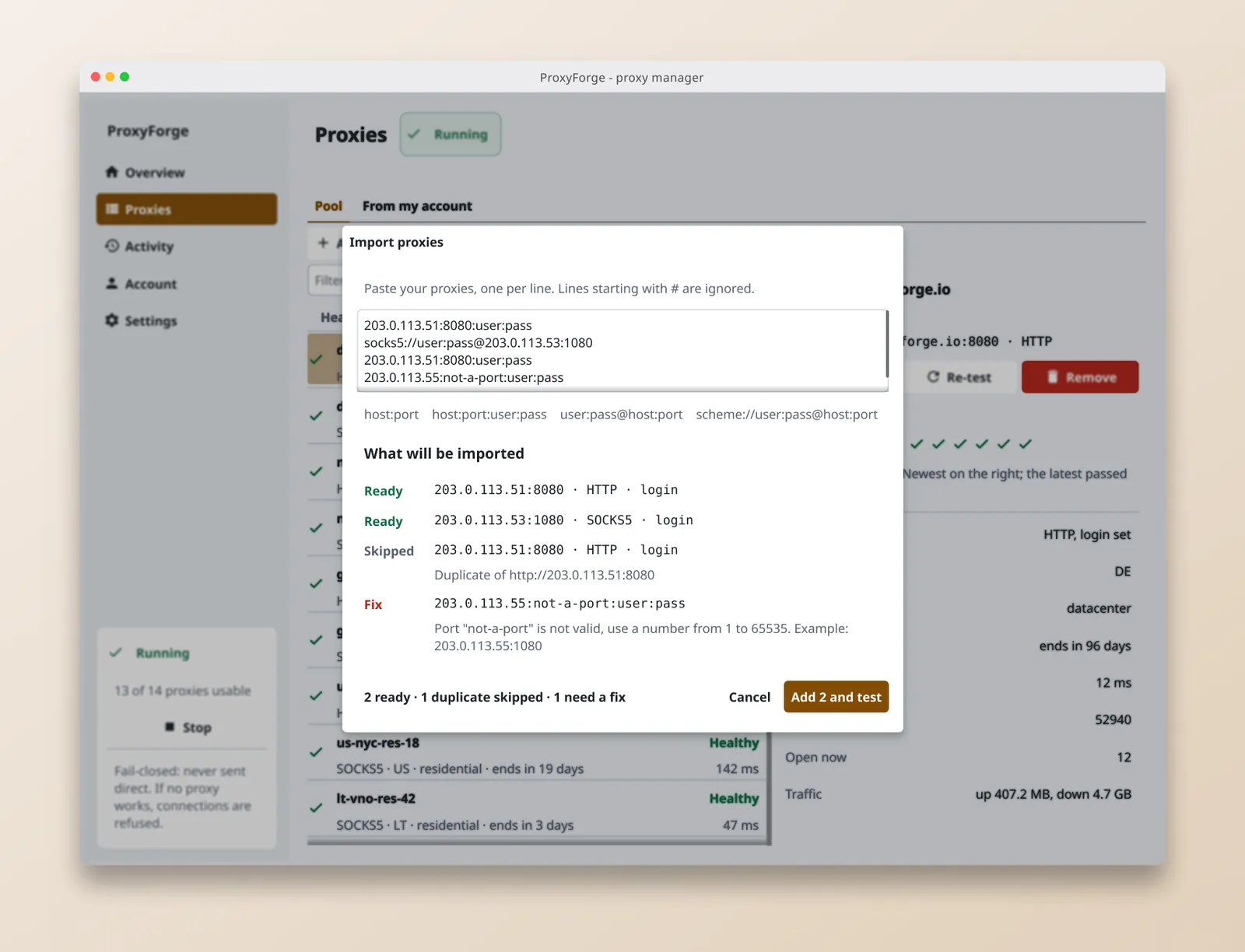
Add N and test adds the ready lines and tests them straight away, eight at a time with a ten-second limit each. The verdict lists dead proxies first with the reason, then the reachable ones with their latency. Copy report for support copies that verdict with addresses and errors and never the logins.
Start the local endpoint
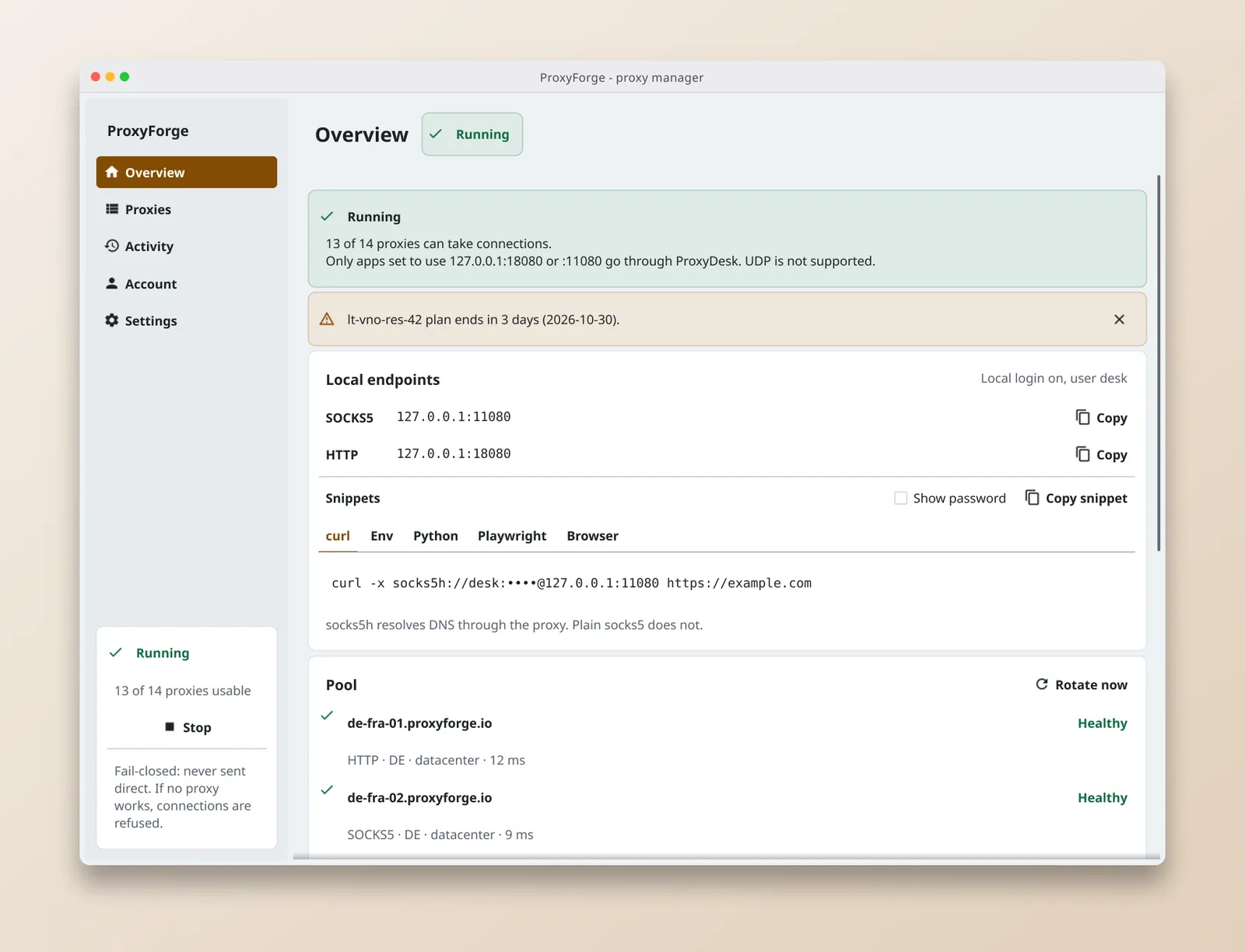
Start opens the two listeners: SOCKS5 on 127.0.0.1:11080 and HTTP on 127.0.0.1:18080. Both ports can be changed under Settings, Local endpoint; a change takes effect the next time you stop and start ProxyDesk. On a shared build box, set a local login there as well: once a username is set, SOCKS5 clients must authenticate, and HTTP clients must send Proxy-Authorization or receive 407 Proxy Authentication Required.
Point your tools at it
The overview generates a snippet per tool, filled in with your ports, and with the local login when one is set. Copy snippet copies the real password even while the screen masks it. Without a local login, they read:
curl -x socks5h://127.0.0.1:11080 https://example.com
export ALL_PROXY=socks5h://127.0.0.1:11080
export HTTP_PROXY=http://127.0.0.1:18080
export HTTPS_PROXY=http://127.0.0.1:18080
import requests  # pip install requests[socks]
proxies = {"http": "socks5h://127.0.0.1:11080", "https": "socks5h://127.0.0.1:11080"}
print(requests.get("https://example.com", proxies=proxies).status_code)
const browser = await chromium.launch({
  proxy: { server: "http://127.0.0.1:18080" },
});
The Browser snippet lists the manual settings instead: SOCKS v5, host 127.0.0.1, port 11080, and proxy DNS when using SOCKS v5 switched on. Use socks5h rather than socks5 wherever a tool offers both, so DNS is resolved through the proxy as well; SOCKS5 vs HTTP proxy explains the difference.
To confirm traffic really leaves through a proxy, ask the echo endpoint once directly and once through ProxyDesk, and compare the ip fields:
curl -s https://api.proxyforge.io/tools/echo
curl -s -x socks5h://127.0.0.1:11080 https://api.proxyforge.io/tools/echo
What happens when a proxy dies
By default each new connection takes the next usable proxy in the list. The alternative under Settings, Rotation, keeps one proxy until it fails, which suits flows that need a stable address; rotating vs sticky proxies covers when that matters. Rotate now moves the next connection on to another proxy.
When a connection through a proxy fails, that proxy leaves rotation and the connection is retried on up to three proxies in total. A proxy that left is re-tested in the background after five minutes, then after waits that double each time up to 30 minutes; both values are adjustable in Settings. Once it passes a check, it returns, and the pool events record it as Recovered.
When no proxy can take a connection, ProxyDesk refuses it rather than sending it from the machine's own address. In a local test with the only upstream stopped, the clients saw:
| Client | What it received |
|---|---|
curl -x socks5h://127.0.0.1:11080 |
A refused SOCKS5 connection, curl exit code 97 |
curl -x http://127.0.0.1:18080 to an HTTPS URL |
502 on CONNECT, curl exit code 7 |
curl -x http://127.0.0.1:18080 to an HTTP URL |
502 with the body no healthy upstream available |
The overview says the same in words: new connections are refused until a proxy works again, and nothing goes direct. Fail-closed proxy setup for crawlers and CI builds a job around that behaviour.
Read the activity log
The Activity page shows the session's traffic in two tabs. Recent connections lists the last 500 connections with destination, upstream proxy, result and bytes. Pool events lists proxies set aside, recovered or failing a probe, with the time of the next try. Export CSV writes the connections with the columns time, destination, upstream, result, cause, error, bytes_up and bytes_down, with times in UTC.
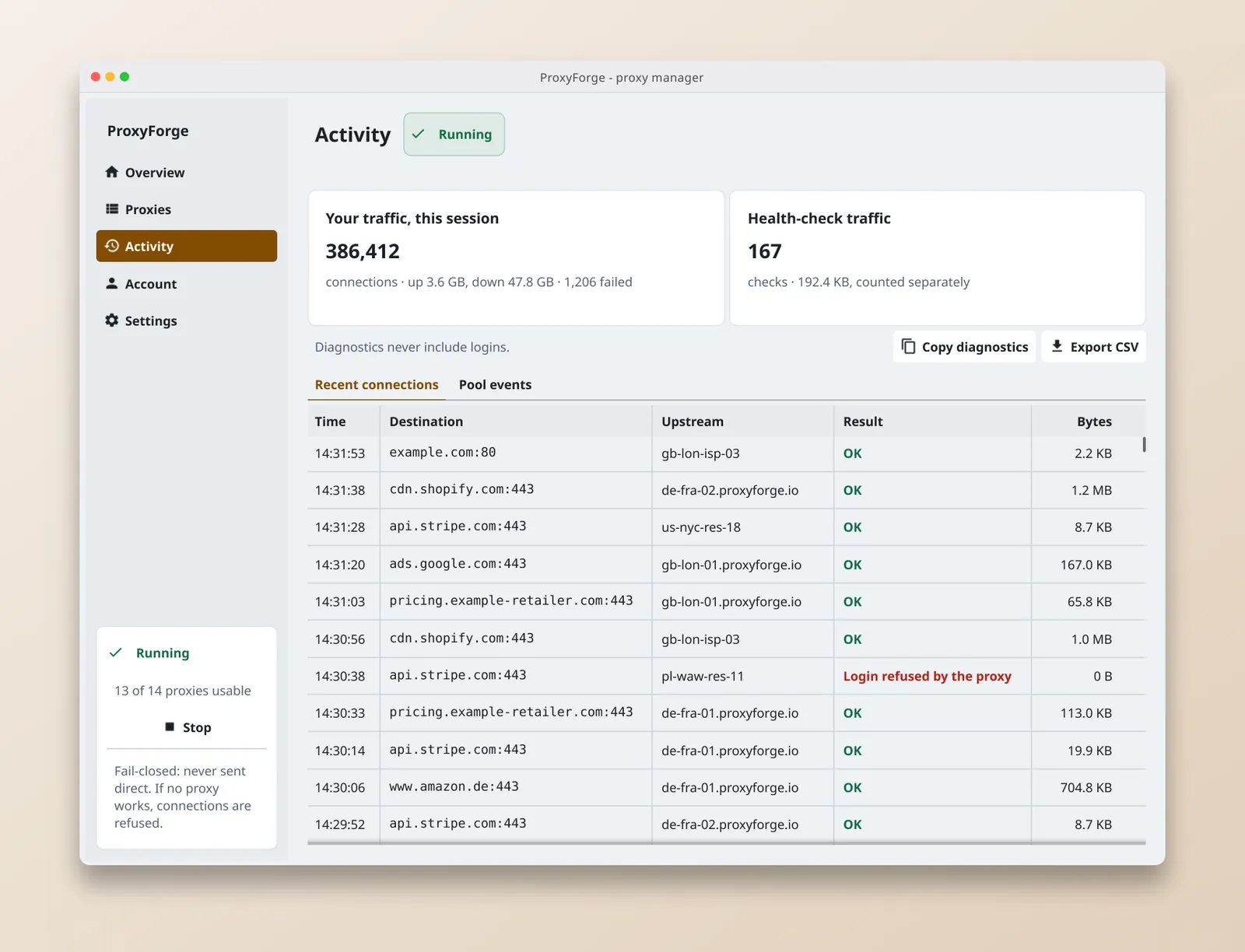
Copy diagnostics produces a support report with the endpoints, the state of each proxy and recent events. It records only whether a proxy has a login, never the login itself.
Limits to plan around
The local address carries TCP only, so UDP, DNS over UDP and HTTP/3 do not pass through it. The HTTP listener sends one forwarded request per upstream connection when a client asks for a plain http:// URL; HTTPS through CONNECT and everything over SOCKS5 are unaffected. There is no autostart and no per-application routing, so start ProxyDesk before the jobs that depend on it. Settings and logins live in a per-user config.json, written with owner-only permissions and holding logins in plain text, which matters if the machine is shared.
For checks people make by hand in a browser rather than jobs on a machine, the browser extension is the better fit. An overview of the app, with screenshots of each screen, is on the ProxyDesk page.